


Seat Adjustment
Manual Seats
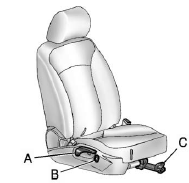
A. Seatback Recline Lever
B. Height Adjustment Switch
C. Seat Position Handle
To adjust the seat position:
1. Pull the handle (C) under the front of the seat cushion.
2. Slide the seat to the desired position and release the handle.
3. Try to move the seat back and forth to be sure it is locked in place.
Press and hold the top or bottom of the switch (B) to raise or lower the seat. Release the switch when the desired height is reached.
To raise or recline the seatback, use the lever (A) on the outboard side of the seat. See Reclining Seatbacks.
Power Seats
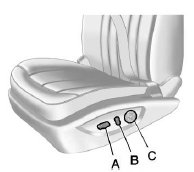
A. Power Seat Adjustment Control
B. Reclining Seatbacks
C. Lumbar Adjustment
To adjust a power seat, if equipped:
► Move the seat forward or rearward by sliding the control (A) forward or rearward.
► Raise or lower the front or rear part of the seat cushion by moving the front or rear of the control (A) up or down.
► Raise or lower the entire seat by moving the control (A) up or down.
See Power Seat Adjustment for more information.
To raise or recline the seatback, tilt the top of the control (B) forward or rearward. See Reclining Seatbacks.
Press the front or rear of the control (C) to increase or decrease lumbar support. See Lumbar Adjustment.
See also:
Linking to a Different Phone
1. Press and hold for two
seconds. The system
responds with “Ready” followed by a tone.
2. Say “Bluetooth”. The system responds with
“Bluetooth ready” followed by a tone.
3. Say â ...
Windshield Replacement
Your vehicle is equipped with an acoustic
windshield. If you ever have to have your
windshield replaced be sure to get an acoustic
windshield so you will continue to have the benefits
an acoustic ...
Safety, Features & Styling
With top crash-test scores across the board, the Verano is a Top Safety Pick
from the Insurance Institute for Highway Safety. Standard features include 10
airbags, plus the antilock brakes and ele ...