


Adjusting the Fader and Balance
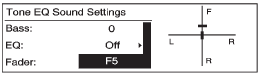
1. Press the TONE button.
2. Select Fader or Balance.
3. Select the value.
Press the  BACK button to go
back to the Tone Settings menu.
BACK button to go
back to the Tone Settings menu.
See also:
Tires
Your new vehicle comes with high-quality tires
made by a leading tire manufacturer. If you ever
have questions about your tire warranty and where
to obtain service, see your vehicle Warranty
b ...
Odometer
The odometer shows how far the
vehicle has been driven, in either
kilometers or miles.
This vehicle has a tamper-resistant
odometer. If the vehicle needs a
new odometer installed, the new
o ...
Sculpted design
Buick's long heritage of leading designs, such as the Y-Job Concept, the
Roadmaster and the Riviera, helped define American automobile design through the
years, according to Ed Welburn, vice presi ...