


Setting a Value
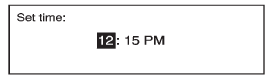
1. Turn the Menu knob to change the current value of the setting.
2. Press SELECT to confirm the setting.
See also:
What to Use
To determine what kind of fluid to use, see
Recommended Fluids and Lubricants.
Always use the proper fluid.
Notice: Use of the incorrect fluid may damage the
vehicle and the damages may not be c ...
Control Buttons (Radio with CD)
The buttons used to control the CD player are:
CD: Press to select the CD player.
or
: Press to select tracks or to rewind
or fast forward within a track.
INFO (Information): Press to display a ...
Symbols
The vehicle has components and
labels that use symbols instead of
text. Symbols are shown along with
the text describing the operation or
information relating to a specific
component, contro ...